
The current developer guidance
The developer FAQ describes saves as being stored in a private app-specific folder, which you typically cannot browse directly. It recommends Sync with Google Drive to transfer progress between Android devices.
For manual backups of synced files, the FAQ points to the MyBoy folder on Google Drive. This is a Drive folder, not a guaranteed path in your phone’s shared storage.
Why old instructions may show another folder
Older app releases and Android storage behavior may expose a visible MyBoy folder. That does not establish the location for every device or for the 2.0.6 package supplied on this site. Do not assume a path such as a shared-storage folder exists without checking your actual installation.
Menu names and available sync features can vary by version. We have not inspected private storage in the supplied APK.
Game saves and save states are different
- Game save: created through the game’s own save menu. This is the progress the game normally reads.
- Save state: created through MyBoy’s emulator menu. It captures a running session, often with a preview image.
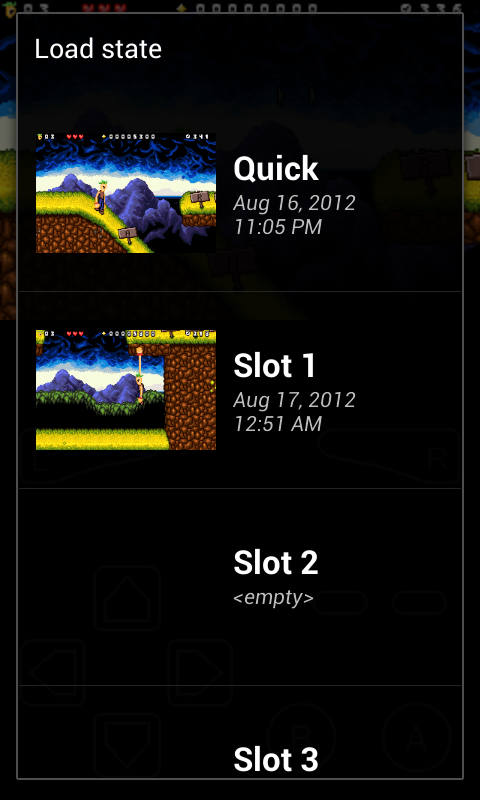
These emulator slots contain save states.
Do not rename a state file and expect it to become a normal game save. Preserve the original file names and keep both kinds of backup when possible.
Move progress to another phone
- Save normally inside your game and close it through MyBoy’s menu.
- If your version provides Google Drive sync, enable it and let synchronization finish.
- Check that your files appear in the MyBoy folder on Drive. Keep a separate copy before changing devices.
- Set up MyBoy on the new phone and use the same account for sync.
- Open the matching game file and confirm the expected save loads before removing the old installation.
If you cannot find or restore a save
Check that sync is enabled and that you are viewing the intended Drive account. Compare the game file’s name and revision with the original. Keep the old phone and files until restoration has been confirmed.
If your version has no sync option, check its available export tools and the developer’s support guidance before uninstalling. A generic file manager may not be able to access private application data.
See the developer FAQ for the current save-transfer instructions.